Mind Mapping Apps for the iPad: A Comparison

iThoughtsHD

Unlike the Android marketplace, Apple’s appstore unfortunately does not allow you try out apps for a couple of minutes and get a refund if you don’t like them. After buying an iPad I wanted to have a good Mindmapping app, but I had no idea which of the six or so options would be the best choice for me. I searched for a site that compared them all, but couldn’t find that either. That’s when I decided to buy them all, use them all and review them all on this blog.

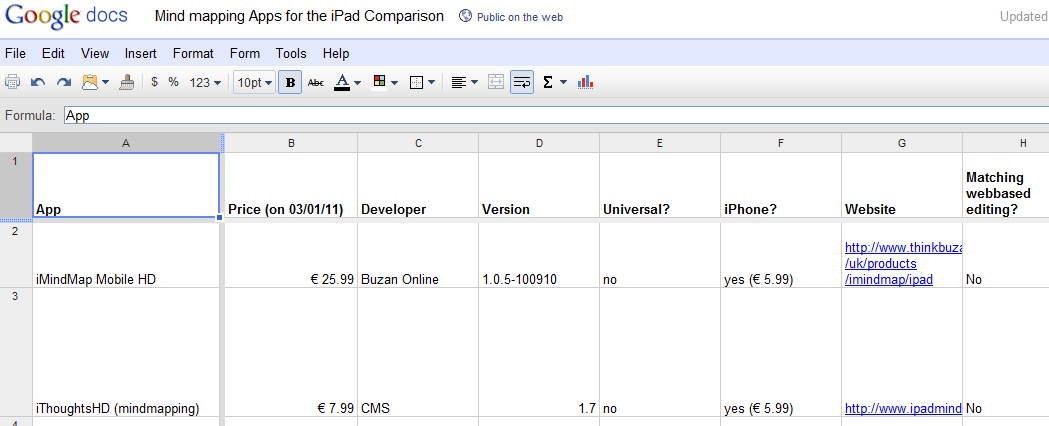
I wanted to make this a definitive review, so I created a companion spreadsheet with all the factual and easily quantifiable information about the different apps. You can find it here (I will not keep it up to date, so if you want to volunteer to do that I can give you access). The spreadsheet will tell you for example whether the app can work with an external screen, if there is an iPhone or Desktop equivalent and what methods and formats are supported for import and export.

iPad mind mapping compared in a spreadsheet

For each of the apps I tested how easy it was to learn and to use, how the mindmaps look, whether it is possible to share the maps easily to other users and locations and whether there are any online services that the maps can sync to. I also gave each of the app a rating (10 is marvellous, whereas 1 is horrible).

iMindMap Mobile HD

€ 25.99 by Buzan Online

iMindMap Mobile HD
iMindMap Mobile HD

This is the offering by the company/man who has feverishly tried to copyright mind mapping and has build an accreditation and consultancy business around helping people leverage mind mapping in their work: Tony Buzan.

The stiff price of the app and the “official” stamp sets high expectations. Unfortunately the app doesn’t deliver. At first glance there is a lot of polish and a professional look (i.e. you get instructions on how to use the app with a slick video, the map overview screen with miniature versions of the mind maps is beautiful), but once you start using it, the shine goes away.

The interface is very counterintuitive. Even very experienced computer users might need to watch the video before they start being capable of inputting data using one of the two input methods. Moving nodes around and deleting them is clumsy. The interface for collapsing branches is shockingly bad. Each node can have a colour set and an icon (from a large collection) but cannot have any notes or URLs attached and can have a note or an URL attached (updated after a comment by Tim Smith).

The external presentation mode shows the map on the external screen and allows the iPad user to decide which topic to show. You cannot edit the map while using the external screen.

Overall it feels like this was built on commission by people with no real love for either mind mapping or the iPad. The people who commissioned the creation of the app, assumedly mind mapping experts from Buzan, should look at some of the other mind mapping apps available and learn that it isn’t only looks that are important.

Pros: Beautiful mind maps, “official” app.
Cons: Hard to use, no interoperability, outrageously expensive

Rating: 5/10

iThoughtsHD (mindmapping)

€ 7.99 by CMS

iThoughtsHD
iThoughtsHD

The longer you use this mind mapping app the more you realise that its maker has tried to make the ultimate tool for mind mapping on the iPad. He is striving for perfection and it shows.

Although the app is intuitive to use for beginners, it also has an extensive feature list for power users: From the setting of backgrounds, to keyboard shortcuts (e.g. three times “enter” will create a new sibling node, whereas three times “space” creates a new child).

Maps are organised in folders and can each have an icon for easy recognition. There is no search function yet to find a particular map or its contents.

Adding, moving and copying nodes and branches of nodes is very easy and can be done intuitively in multiple ways. Occasionally the app will misinterpret your intentions, but this is quickly remedied by a quick tap on the undo button.

The nodes can contain all kinds of information, varying from task related items (priority, progress, start- and due date, all with matching icons) to notes, URLs and icons. The colour and shapes are customisable too and can be applied to all children in a branch. It is possible and easy to make links between different nodes. The boundary option is unique and useful: it puts all the nodes in a branch in an outline and colours the background.

iThoughtsHD has its own native file format, but also supports many other mind mapping formats. There are a number of im- and export options. One way that works very well is the Dropbox integration. There is a two-way sync between iThoughtsHD and Dropbox. This is great for backup and also allows an easy way to safely collaborate with someone else on a map using a shared Dropbox folder.

Another iThoughtsHD feature that the other apps are missing is a revision history. iThoughtsHD keeps older versions of your map in case you want to go back in time (although the most recent version of the app seems to have lost this functionality has only made this functionality available when creating a new map (updated after a tweet from the makers of the app)). The app actively advises you not to rely on iTunes for doing a full backup and has a way to send an email with your complete data in an archive. This archive can then be imported in case it is needed.

Pros: Most complete feature set, very rich in its im- and export options
Cons: Could be overkill for some users

Rating: 9/10

Maptini

€ 3.99 by Barking Minds LLC

Maptini
Maptini

This app is relatively new (I believe the web service is still in beta). It is a very simple app with an output that looks similar to MindNode (with the concepts/nodes on narrow lines, rather than in rounded boxes).

The main point of Maptini is that allows for very easy collaboration using either the app or the version in the browser (there is even a way to work in mobile safari). It is incredibly quick to make your map completely public and let anyone else with a Maptini account edit the map.

The editing is simple and fast and there is not a lot to worry about: there are just 6 colours and a delete button. The iPad app does not allow any importing and exporting of different mind maps: this all needs to be done through the web interface.

Collaborative editing in realtime does really work as advertised, so if it is important for you to have multiple people work on the same mind map at the same time, then this app is worth a shot.

Pros: made for collaboration
Cons: no other features than basic map-based outlining

Rating: 6/10

MindMeister for iPad

€ 5.99 by MeisterLabs

MindMeister for iPad

MindMeister started its life on the web: for a yearly subscription fee you can have an unlimited number of mind maps stored online, accessible and editable through any modern browser and sharable with others for realtime collaborative work.

This web-based experience is now also available on mobile devices. The iPad app does not require a subscription with the web-service, but will only allow you to sync six mind maps from the iPad to your online account if you aren’t a subscriber (while not being completely transparent about how to influence which six maps will synched).

Like most (but not all) apps, MindMeister uses the model where you select a node and then click a “plus” to create a child of this node. This means that it always takes two taps to add a child, but what you lose in the number of taps, you gain in consistency. Moving nodes around is easy and the dedicated trashcan button is smartly put far away from the other node-related buttons in the interface. An undo button seems to be missing.

Nodes can be linked to each other, but it is not clear how to remove these links once you have created them (is this possible at all?). There is a good set of icons, the colour is flexible (you can even theme the whole map in one go), you can create direct links to URLs and email addresses and there are task related options. Tasks is something where MindMeister really shines: not only can you note the start/due date, priority, effort and completion, you can also assign the task to other MindMeister users. These tasks then sync to the web and people will get reminders when tasks are due.

The tasks functionality points to the ideal use case for MindMeister: if you work in a small team you could use it for all the minutes of meetings, for all the notes and for all the planning. The collaborative sharing would allow everybody to have the same view. When working through the browser the online collaboration works as fast as GoogleDocs (near instant synchronisation), on the iPad it seems to update a bit slower making it less easy to use with a virtual team.

The “Geistesblitz” functionality gets a lot of marketing in the description in the appstore, but is less useful than it is made out to be. What it allows you to do is to assign a default mind map (this needs to be done online). Whatever you then add in the Geistesblitz screen is added as a child of the “Geistesblitz” node in this default app. Most people will have another app to capture random notes and thoughts like this.

Most other apps with external screen support keep the iPad screen the same and display a version of the map (without any interface elements) on the external screen. MindMeister shows the complete iPad screen on the external screen, including all interface elements.

Rating: 8/10

MindNode

€ 4.99 by Markus Müller

MindNode
MindNode

This is very slick app that is very intuitive and quick to use. The feature set is light: it is impossible to do anything else with a node but give it a colour and there are limited options for im- and export. What it does, it does exceptionally well: it is easy to add nodes and delete them (there is an undo and a dedicated delete button) and moving a node takes no effort too.

The thin and freshly coloured lines on which the text is written are pleasing to the eye. The one thing that could be improved is the fact that auto-lay-outing (the app calls it reorganising) has to be triggered manually whenever the map gets too messy: there is no way to have the app do it continuously.

In most cases a mind map is nothing more than a hierarchical outline and could alternatively be displayed as an indented list. Kudos to MindNode for providing an easy way to navigate the map in list form and to provide a search box allowing you to quickly find a particular piece of information in a large map.

The app allows you to save maps to Dropbox in different formats, but this is only a one-way street: there is no easy way to import maps from Dropbox in a similar manner. This is one of the few apps that supports printing. There is no easy way for collaborative editing.

Pros: Very fast and minimal interface
Cons: Light on features with no advanced lay-out option or “intelligent nodes”

Rating: 7/10

Total Recall

€ 0 for three maps, € 0.79 for unlimited maps by Zyense

Total Recall
Total Recall

The opening map of this mind mapping app has a bit of a childish look (probably caused by the pastel colours and the bubbly nodes). The app is very simple in its functionality.

Each of the bubbles (nodes) can have its colour set and can be connected to any of the other bubbles. These connections are many to many, so with Total Recall you aren’t stuck with a purely hierarchical system, but can create real networks too. Because of this, the automatic lay-outing algorithm is interesting: you press play to start it, after which it starts pulling on all the connections until it has reached some form of equilibrium.

There is no support for an external screen and no other way than email to collaborate with other users.

Pros: Cheap, ability to have multiple connections between nodes
Cons: Very limited functionality, not very fast to use

Rating: 5/10

Trout

€ 1.59 by Digital-Dirtbag

Trout
Trout

This is definitely the odd one out in this list of apps. Trout is not made to be similar to anything else, instead it looks and feels like it was written to solve the knowledge management issues that the author himself must have had.

In one way that is great: this is the only app that allows you to record sound snippets with each of the nodes and to add images that can be zoomed. There is an interesting quick direct link to Google search results for the words in the node and the way that you can add your own meaning to both colours and icons is refreshing.

On the other hand it also a bit of a hindrance: this is one of the hardest apps to come to grips with and some of the icons on the buttons are really unclear. There is little or no documentation, so you are left to yourself to find out what a “model” is and how to work with defining icons that can then be sorted in the list view.

This app would mainly be recommended to curious minds.

Pros: Ability to record sound and upload images
Cons: Unclear interface

Rating: 6.5/10

The Verdict:

Three of these tools are really viable for everyday use. If you are interested in a very quick and clean solution that works well, then go for MindNode.

For the individual user who wants to make sure that their maps look good and who needs to be flexible with where the data of the map goes, iThoughtsHD is the best option.

If you work in a small team and you get other people to also subscribe for an account, then MindMeister seems to be the best option.

My costs

It cost me € 51.33 to buy all the apps and do this review of them. As an experiment, I would like the readers of this post to help me carry these costs. Would you be willing to donate a small amount? ((I also would not say “no” to a free MindMeister subscription!). I will remove this button as soon as my costs are recovered. Update 3/1/13: My costs have been recovered (thanks to about 20 generous readers). If you appreciated the reviews, then I would still appreciate a donation.

Please help me recover the costs of this review

I have to thank Linux Format for their Roundup feature format, which I used as the inspiration for the way this post is set up.

Lak11 Week 2: Rise of “Big Data” and Data Scientists

These are my reflection and thoughts on the second week of Learning and Knowledge analytics (Lak11). These notes are first an foremost to cement my own learning experience, so for everybody but me they might feel a bit disjointed.

What was week 2 about?

This week was an introduction to the topic of “big data”. As a result of all the exponential laws in computing, the amount of data that gets generated every single day is growing massively. New methods of dealing with the data deluge have cropped up in computer science.  Businesses, governments and scientists are learning how to use the data that is available to their advantage. Some people actually think this will fundamentally change our scientific method (like Chris Anderson in Wired).

Big data: Hadoop

Hadoop is one of these things that I heard a lot about without ever really understanding what it was. This Scoble interview with the CEO of Cloudera made things a lot clearer for me.

[youtube=http://www.youtube.com/watch?v=S9xnYBVqLws]

Here is the short version: Hadoop is a set of open source technologies (it is part of the Apache project) that allows anyone to do large scale distributed computing. The main parts of Hadoop are a distributed filesystem and a software framework for processing large data sets on clusters.

The technology is commoditised, imagination is what is needed now

The Hadoop story confirmed for me that this type of computing is already largely commoditised. The interesting problems in big data analytics are probably not technical anymore. What is needed isn’t more computing power, we need more imagination.

The MIT Sloan Management Review article titled Big Data, Analytics and the Path from Insights to Value says as much:

The adoption barriers that organizations face most are managerial and cultural rather than related to data and technology. The leading obstacle to wide-spread analytics adoption is lack of understanding of how to use analytics to improve the business, according to almost four of 10 respondents.

This means that we should start thinking much harder about what things we want to know that we couldn’t get before in a data-starved world. This means we have to start with the questions. From the same article:

Instead, organizations should start in what might seem like the middle of the pro-cess, implementing analytics by first defining the insights and questions needed to meet the big busi-ness objective and then identifying those pieces of data needed for answers.

I will therefore commit myself to try and formulate some questions that I would like to have answered. I think that Bert De Coutere’s use cases could be an interesting way of approaching this.

This BusinessWeek excerpt from Stephen Baker’s The Numerati gives some insight into where this direction will take us in the next couple of years. It profiles a mathematician at IBM, Haren, who is busy working on algorithms that help IBM match expertise to demand in real time, creating teams of people that would maximise profits. In the example, one of the deep experts takes a ten minute call while being on the skiing slopes. By doing that he:

[..] assumes his place in what Haren calls a virtual assembly line. “This is the equivalent of the industrial revolution for white-collar workers,”

Something to look forward to?

Data scientists, what skills are necessary?

This new way of working requires a new skill set. There was some discussion on this topic in the Moodle forums. I liked Drew Conway’s simple perspective, basically a data scientist needs to be on the intersection of Math & Statistics Knowledge, Substantive Expertise and Hacking Skills. I think that captures it quite well.

Data Science Venn Diagram (by Drew Conway)

How many people do you know who could occupy that space? The How do I become a data scientist? question on Quora also has some very extensive answers as well.

Connecting connectivism with learning analytics

This week the third edition of the Connectivism and Connective Knowledge course has started too. George Siemens kicked of by posting a Connectivism Glossary.

It struck me that many of the terms that he used there are things that are easily quantifiable with Learning Analytics. Concepts like Amplification, Resonance, Synchronization, Information Diffusion and Influence are all things that could be turned into metrics for assessing the “knowledge health” of an organisation. Would it be an idea to get clearer and more common definitions of these metrics for use in an educational context?

Worries/concerns from the perspective of what technology wants

Probably the most lively discussion in the Moodle forums was around critiques of learning analytics. My main concern for analytics is the kind of feedback loop it introduces once you become public with the analytics. I expressed this in a reference to Goodhart’s law which states that:

Any observed statistical regularity will tend to collapse once pressure is placed upon it for control purposes

George Siemens did a very good job in writing down the main concerns here. I will quote them in full for my future easy reference.

1. It reduces complexity down to numbers, thereby changing what we’re trying to understand
2. It sets the stage for the measurement becoming the target (standardized testing is a great example)
3. The uniqueness of being human (qualia, art, emotions) will be ignored as the focus turns to numbers. As Gombrich states in “The Story of Art”: The trouble about beauty is that tastes and standards of what is beautiful vary so much”. Even here, we can’t get away from this notion of weighting/valuing/defining/setting standards.
4. We’ll misjudge the balance between what computers do best…and what people do best (I’ve been harping for several years about this distinction as well as for understanding sensemaking through social and technological means).
5. Analytics can be gamed. And they will be.
6. Analytics favour concreteness over accepting ambiguity. Some questions dont have answers yet.
7. The number/quantitative bias is not capable of anticipating all events (black swans) or even accurately mapping to reality (Long Term Capital Management is a good example of “when quants fail”: http://en.wikipedia.org/wiki/Long-Term_Capital_Management )
8. Analytics serve administrators in organizations well and will influence the type of work that is done by faculty/employees (see this rather disturbing article of the KPI influence in universities in UK: http://www.nybooks.com/articles/archives/2011/jan/13/grim-threat-british-universities/?page=1 )
9. Analytics risk commoditizing learners and faculty – see the discussion on Texas A & M’s use of analytics to quantify faculty economic contributions to the institution: http://www.nybooks.com/articles/archives/2011/jan/13/grim-threat-british-universities/?page=2 ).
10. Ethics and privacy are significant issues. How can we address the value of analytics for individuals and organizations…and the inevitability that some uses of analytics will be borderline unethical?

This type of criticism could be enough for anybody to give up already and turn their back to this field of science. I personally belief that this would a grave mistake. You would be moving against the strong and steady direction of technology’s tendencies.

SNAPP: Social network analysis

The assignment of the week was to take a look at Social Networks Adapting Pedagogical Practice (better known as SNAPP) and use it on the Moodle forums of the course. Since I had already played with it before I only looked at Dave Cormier‘s video of his experience with the tool:

[youtube=http://www.youtube.com/watch?v=ZHNM8FWrpLk]

Snapp’s website gives a good overview of some of the things that a tool like this can be used for. Think about finding disconnected or at-risk students, seeing who are the key information brokers in the class, use it for “before and after” snapshots of a particular intervention, etc.

Before I was able to use it inside my organisation I needed to make sure that the tool does not send any of the data it scrapes back home to the creators of the software (why wouldn’t it, it is a research project after all). I had an exchange with Lori Lockyer, professor at Wollongong, who assured me that:

SNAPP locally complies the data in your Moodle discussion forum but it does not send data from the server (where the discussion forum is hosted) to the local machine nor does it send data from the local machine to the server.

Making social networks inside applications (and ultimately inside organisations) more visible to many more people using standard interfaces is a nice future to look forward to. Which LMS is the first to have these types of graphs next to their forum posts? Which LMS will export graphs in some standard format for further processing with tools like Gephi?

Gephi is one of the tools by the way, that I really should start to experiment with sooner rather than later.

The intelligent spammability of open online courses: where are the vendors?

One thing that I have been thinking about in relation to these Open Online Courses is how easy it would be for vendors of particular related software products to come and crash the party. The open nature of these courses lends itself to spam I would say.

Doing this in an obnoxious way will ultimately not help you with this critical crowd, but being part of the conversation (Cluetrain anybody?) could be hugely beneficial from a commercial point of view. As a marketeer where else would you find as many people deeply interested into Learning Analytics as in this course? Will these people not be the influencers in this space in the near future?

So where are the vendors? Do you think they are lurking, or am I overstating the opportunity that lies here for them?

My participation in numbers

Every week I give a numerical update about my course participation (I do this in the spirit of the quantified self, as a motivator and because it seems fitting for the topic). This week I bookmarked 37 items on Diigo, wrote 3 Lak11 related tweets, wrote 5 Moodle forum posts and 1 blog post.

Lak11 Week 1: Introduction to Learning and Knowledge Analytics

Every week I will try and write down some reflections on the Open Online Course: Learning and Knowledge Analytics. These will by written for myself as much as for anybody else, so I have to apologise in advance about the fact that there will be nearly no narrative and a mix between thoughts on the contents of the course and on the process of the course.

So what do I have to write about this week?

My tooling for the course

There is a lot of stuff happening in these distributed courses and keeping up with the course required some setup and preparation on my side (I like to call that my “tooling”). So what tools do I use?

A lot of new materials to read are created every day: Tweets with the #lak11 hashtag, posts in all the different Moodle forums, Google groups and Learninganalytics.net messages from George Siemens and Diigo/Delicious bookmarks. Thankfully all of these information resources create RSS feeds and I have been able to add them all to special-made Lak11 folder in my Google Reader (RSS feed). That folder sorts its messages based on time (oldest first) allowing me some understanding of the temporal aspects of the course and making sure I read a reply after the original message. A couple of times a day I use the excellent MobileRSS reader on my iPad to read through all the messages.

There is quite a lot of reading to do. At the beginning of the week I read through the syllabus and make sure that I download all the PDF files to GoodReader on the iPad. All web articles are stored for later reading using the Instapaper service. I have given both GoodReader and Instapaper Lak11 folders. I do most of the reading of these articles on the train. GoodReader allows me to highlight passages and store bookmarks in the PDF file itself. With Instapaper thus is a bit more difficult: when I read a very interesting paragraph I have to highlight it and email it to myself for later processing.

Each and every resource that I touch for the course gets its own bookmark on Diigo. Next to the relevant tags for the resource I also tag them with lak11 and weekx (where x is the number of the week) and share them to the Learning Analytics group on Diigo. These will provide me with a history of the interesting things I have seen during the course and should help me in writing a weekly reflective post.

So far the “consumer” side of things. As a “producer” I participate in the Moodle forums. I can easily find back all my own posts through my Moodle profile and I hope to use some form of screen-scraper at the end of the course to pull a copy of everything that I have written. I use this Worpress.com hosted blog to write and reflect on the course materials and tag my course-related post with “lak11” so that show up on their own page (and have their own feed in case you are interested). On Twitter I occasionally tweet with #lak11, mostly to refer to a Moodle- or blog post that I have written or to try and ask the group a direct question.

What is missing? The one thing that I don’t use yet is something like a mind mapping or a concept mapping tool. The syllabus recommends VUE and CMAP and one of the assignments each week is to keep updating a map for the course. These tools don’t seem to have an iPad equivalent. There is some good mind mapping tools for the iPad (my favourite is probably iThoughtsHD, watch this space for a mind mapping comparison of iPad apps), but I don’t seem to be able to add using it into my workflow for the course. Maybe I should just try a little harder.

My inability to “skim and dive”

This week I reconfirmed my inability to “skim and dive”. For these things I seem to be an all or nothing guy. There are magazines that I read completely from the first page to the last page (e.g. Wired). This course seems to be one of these things too. I read every single thing. It is a bit much currently, but I expect the volume of Moodle and Twitter messages to go down quite significantly as the course progresses. So if I can just about manage now, it should become relatively easy later on.

The readings of this week

There were quite a few academic papers in the readings of this week. Most of them provided an overview of education datamining or academic/learning analytics. Many of the discussions in these papers seemed quite nominal to me. They probably are good references to keep and have a wealth of bibliographical materials that I could look at at some point in the future. For now, they lacked any true new insights for me and appeared to be pretty basic.

Live sessions

Unfortunately I wasn’t able to attend any of the Elluminate sessions and I haven’t listened to them yet either. I hope to catch up this week with the recordings and maybe even attend the guest speaker live tomorrow evening.

Marginalia

It has been a while since I last actively participated in a Moodle facilitated course. Moodle has again proven to be a very effective host for forum based discussions. One interesting Moodle add-on that I had not seen before is Marginalia a way to annotate forum posts in Moodle itself which can be private or public. Look at the following Youtube video to see it in action.

[blip.tv ?posts_id=4054581&dest=-1]

I wonder if I will use it extensively in the next few weeks.

Hunch

One thing that we were asked to try out as an activity was Hunch. For me it was interesting to see all the different interpretations that people in the course had about how to pick up this task and what the question (What are the educational uses of a Hunch-like tool for learning?) actually meant. A distributed course like this creates a lot of redundancy in the answers. I also noted that people kept repeating a falsehood (needing to use Twitter/Facebook to log in). My explanation of how Hunch could be used by the weary was not really picked up. It is good to be reminded at times that most people in the world do not share my perspective on computers and my literacy with the medium. Thinking otherwise is a hard to escape consequence of living in a techno-bubble with the other “digerati”.

I wrote the following on the topic (in the Moodle forum for week 1):

Indeed the complete US-centricness of the service was the first thing that I noticed. I believe it asked me at some point on what continent I am living. How come it still asks me questions to which I would never have an answer? Are these questions crowdsourced too? Do we get them randomly or do we get certain questions based on our answers? It feels like the former to me.

The recommendations that it gave me seemed to be pretty random too. The occasional hit and then a lot of misses. I had the ambition to try out the top 5 music albums it would recommend me, but couldn’t bear the thought of listening to all that rock. This did sneak a little thought into my head: could it be that I am very special? Am I so eclectic that I can defeat all data mining effort. Am I the Napoleon Dynamite of people? Of course I am not, but the question remains: does this work better for some people than for others.

One other thing that I noticed how the site seemed to use some of the tricks of an astrologer: who wouldn’t like “Insalata Caprese”, seems like a safe recommendation to me.

In the learning domain I could see an application as an Electronic Performance Support System. It would know what I need in my work and could recommend the right website to order business cards (when it sees I go to a conference) or an interesting resource relating to the work that I am doing. Kind of like a new version of Clippy, but one that works.

BTW, In an earlier blogpost I have written about how recommendation systems could turn us all into mussels (although I don’t really believe that).

Corporate represent!

Because of a very good intervention by George Siemens, the main facilitator of the course, we are now starting to have a good discussion about analytics in corporate situations here. The corporate world has learning as a secondary process (very much as a means to a goal) and that creates a slightly different viewpoint. I assume the corporate people will form their own subgroup in some way in this course. Before the end of next week I will attempt to flesh out some more use cases following Bert De Coutere’s examples here.

Bersin/KnowledgeAdvisors Lunch and Learn

At the end of January I will be attending a free Bersin/KnowledgeAdvisors lunch and learn titled Innovation in Learning Measurement – High Impact Measurement Framework in London (this is one day before the Learning Technologies 2011 exhibit/conference). I would love to meet other Lak11 participants there. Will that happen?

My participation in numbers

Every week I will try and give a numerical update about my course participation. This week I bookmarked 33 items on Diigo, wrote 10 Lak11 related tweets, wrote 25 Moodle forums post and 2 blog posts.

Workflow Driven Apps Versus App Driven Workflow

Arjen Vrielink and I write a monthly series titled: Parallax. We both agree on a title for the post and on some other arbitrary restrictions to induce our creative process. This month we write about how the constant flux of new apps and platforms influences your workflow. We do this by (re-)viewing our workflow from different perspectives. After a general introduction we write a paragraph of 200 words each from the perspective of 1. apps, 2. platform and 3. workflow itself. You can read Arjen’s post with the same title here.

Instapaper on my iPhone

To me a workflow is about two things mainly: the ability to capture things and the ability to time-shift. Both of these need to be done effectively and efficiently. So let’s take a look at three separate processes and see how they currently work for me: task/todo management, sharing with others and reading news and interesting articles (not books). So how do I work nowadays for each of these three things?

Workflow
I use Toodledo for my task/todo management. Whenever I “take an action” or think of something that I need to do at some point in the future I fire up Toodledo and jot it down. Each item is put in a folder (private, work, etc.), gets a due date (sometimes with a timed reminder to email if I really cannot forget to do it) and is given a priority (which I usually ignore). At the beginning and end of every day I run through all the tasks and decide in my head what will get done.

For me it important to share what I encounter on the web and my thoughts about that with the rest of the world. I do this in a couple of different ways: explicitly through Twitter, through Twitter by using a Bit.ly sidebar in my Browser, in Yammer if it is purely for work, on this WordPress.com blog, through public bookmarks on Diigo, by sending a direct email or by clicking the share button in Google Reader.

I have subscribed to 300+ RSS feeds and often when I am scanning them and find something interesting and I don’t have the opportunity to read it at that time. I use Instapaper to capture these articles and make them available for easy reading later on. Instapaper doesn’t work with PDF based articles so I send those to a special email address so that I can pick them up with my iPad and save them to GoodReader when it is convenient.

Platform
“Platform” can have multiple meanings. The operating system was often called a platform. When you heavily invested into one platform it would become difficult to do any of your workflows with a different platform (at my employer this has been the case for many years with Microsoft and Exchange: hard to use anything else). Rich web applications have now turned the Internet itself into a workflow platform. This makes the choice for an operating system nearly, if not totally, irrelevant. I regularly use Ubuntu (10.04, too lazy to upgrade so far), Windows Vista (at work) and iOS (both on the iPhone and the iPad). All of the products and services mentioned either have specialised applications for the platform or are usable through any modern web browser. The model I prefer right now is one where there is transparent two-way synching between a central server/service and the different local apps, allowing me access to my latest information even if I am not online (Dropbox for example uses this model and is wonderful).

What I have noticed though, is that I have strong preferences for using a particular platform (actually a particular device) for doing certain tasks. The iPad is my preference for any reading of news or of articles: the “paginate” option on Instapaper is beautiful. Sharing is best done with something that has a decent keyboard and Toodledo is probably used the most with my iPhone because that is usually closest at hand.

Apps
Sharing is a good example of something where the app drives my behaviour very much: the app where I initially encounter the thing I want to share needs to support the sharing means of choice. This isn’t optimal at all: if I read something interesting in MobileRSS on the iPad that I want to share on Yammer, then I usually email the link from MobileRSS to my work email address, once at work I copy it from my mail client into the Browser version of Yammer and add my comments. This is mainly because Yammer (necessarily) has to be a closed off to the rest of the world with its APIs.

Services that create the least hickups in my workflow are those that have a large separation between the content/data of the service and the interface. Google Reader and Toodledo both provide very complete APIs that allow anybody to create an app that accesses the data and displays it in a smart way. The disadvantage of these services is that I am usually dependent on a single provider for the data. In the long term this is probably not sustainable. Things like Unhosted are already pointing to the future: an even stricter separation between data and app. Maybe in that future, the workflow can start driving the app instead of the other way around.

Learning and Knowledge Analytics 2011: I Will Participate

Mining Social Networks (The Economist)
Mining Social Networks (The Economist/Andy J. Miller)

George Siemens has written about the upcoming Learning and Knowledge Analytics 2011 course (#lak11). After reading the very interesting draft syllabus I have decided to actively participate. This means you should be seeing reflections about the course in this very blog soon. The dedicated Moodle site for the course asks participants to introduce themselves and write about their course expectations. I have posted the following:

I am a 34 year old guy from Amsterdam in the Netherlands. I work as the “Innovation Manager for Global Learning Technologies” at Shell International (at the headquarters in The Hague). Before this job I was heavily involved with the Moodle project as an e-learning consultant working for the Dutch Moodle Partner (Stoas Learning). Before that I was a teacher at a high school in Amsterdam (I taught PE and project based education).

I love technology and am deeply interested in how it affects society. One of my business cards uses my favourite quote (from Yochai Benkler): “Technology creates feasibility spaces for social practice” (see here for more context). To me, this open course is an example too of a practice enabled by technological possibilities.

My blog can be found at http://blog.hansdezwart.info and you should also find links to my other social networking presences there. I try to blog regularly and what I write on this course is here.

I intend to actively participate in this course. For me this means:

  • Spending time to read and annotate all the course materials during my commute (1.5 hours each way) on my iPad.
  • Writing reflections at least once a week on my blog
  • Doing all the suggested activities and participate actively in the Moodle forums.
  • Try to attend the weekly live Elluminate sessions (if the timezone agrees with my schedule) or at least watch the recordings.

If I manage to the above, then the course will be a success for me. The topic is inherently fascinating to me and I would love to be helped with how learning and knowledge analytics could help my professional practice.

Looking forward to meeting other participants and learning together!

It would be great if some of my readers would also be able to join!